
Built on C/C++ hash-table cores
No account required · Windows · v1.0
Exports rows that appear in both Master and Compare.
TXT
Plain text lists
Every line in the file is treated as one data entry — drop in a list and compare it immediately.
Free
Line-by-line
CSV
Spreadsheet columns
Choose exactly which column (A, B, C…) and which starting row to scan, so only the data you need gets pulled in.
Pro
Column select
Row offset
01
Sort results A–Z
Output rows are automatically arranged in alphabetical order, ready to scan or hand off.
02
Trim whitespace
Leading and trailing spaces are stripped from every row, so a stray keystroke never breaks a match.
03
Case-insensitive matching
"abc" and "ABC" are treated as the same value — and the original capitalization is kept in the export.
04
Auto-split large outputs
Results over 100,000 lines are split into Part 1, Part 2 and so on, so files stay light enough for Notepad or Excel.
Built for files that crash other tools
ListDedupe runs on a Cython-optimized C/C++ core with hash table lookups, so matching happens at constant time per row instead of slowing down as your lists grow.
Multi-threading keeps the interface responsive while a comparison runs in the background — no "Not Responding" screen, even on multi-million-row files.
Line-by-line
Hash tables
Multi-threaded
High-DPI UI
10K rows
0.04s
500K rows
0.9s
5M rows
6.1s
10M+ rows
12s
66% off
Free
$0
Enough to find duplicates between two plain text lists.
✓
Duplicates mode (A ∩ B).
✓
TXT input format.
✓
Sort results A–Z.
Most popular
Pro
$2.99
$1
One-time
All five set operations, CSV support and full output cleanup.
✓
All 5 modes (A−B, B−A, AB, AB−D).
✓
CSV with column and row select.
✓
Trim whitespace.
✓
Case-insensitive matching.
✓
Auto-split outputs over 100k lines.
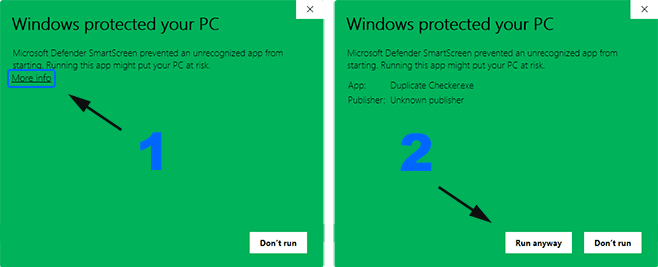
I see a blue Windows SmartScreen warning when opening the app. Is it safe?

Note:
Because the app is not yet digitally signed, Windows SmartScreen may trigger on first launch. This is a standard warning for unsigned software — the app is completely safe.
To proceed: click More info on the warning screen, then select Run anyway. The prompt will not appear again after the first successful launch.
Can I transfer my Pro license to another computer or re-activate it?
The Pro license is tied to your machine's hardware as an anti-piracy measure. If you need to switch computers, follow these steps to free up your activation slot:
What is the maximum file size or row count supported?
There is no hard limit built into the software. ListDedupe processes data using in-memory hash tables, so throughput scales with your system RAM. In practice it handles 10 million+ rows on a standard machine.
For very large outputs, enable Auto-split so results are chunked into parts of ≤ 100,000 lines each, keeping them manageable in Notepad or Excel.
Will the interface freeze while a large comparison is running?
No. ListDedupe offloads all processing to a background thread, so the UI stays fully responsive during computation. You will never see a "Not Responding" state in the title bar, regardless of file size.
Does case-insensitive matching alter the text in my output file?
No. ListDedupe uses a smart cache that compares lowercase copies internally while keeping the original capitalization of each row intact in the exported result. Enabling case-insensitive matching only affects how rows are matched — never how they are written to disk.
Does the free version have any row-count restrictions?
No. The free version gives you the full performance of the Cython core — there are no row caps or time limits. The only difference between Free and Pro is which modes and options are unlocked. You can process files of any size in the free Duplicates (D) mode.