1. Sử dụng Plugin để tắt RSS WordPress
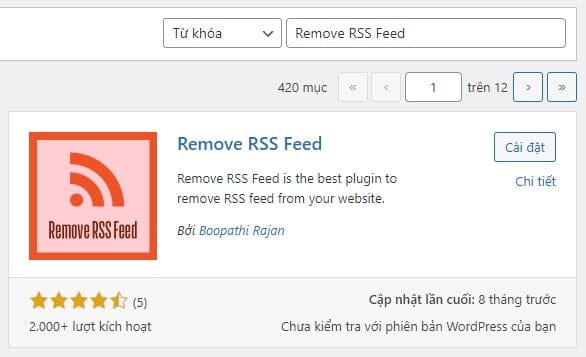
Đơn giản và nhanh chóng, các bạn chỉ cần sử dụng plugin Remove RSS Feed để tắt RSS WordPress:
2. Sử dụng code PHP để tắt RSS WordPress
Thêm đoạn mã sau vào file functions.php của theme đang sử dụng:
add_action('do_feed_rss2_comments', 'fb_disable_feed', 1);
add_action('do_feed_atom_comments', 'fb_disable_feed', 1);
add_action('do_feed_atom', 'fb_disable_feed', 1);
add_action('do_feed_rss2', 'fb_disable_feed', 1);
add_action('do_feed_rdf', 'fb_disable_feed', 1);
add_action('do_feed_rss', 'fb_disable_feed', 1);
add_action('do_feed', 'fb_disable_feed', 1);
function fb_disable_feed() {
	wp_die( __('Website này đã tắt chức năng RSS. Vui lòng trở lại <a href="'. get_bloginfo('url') .'">Trang Chủ</a>!') );
}